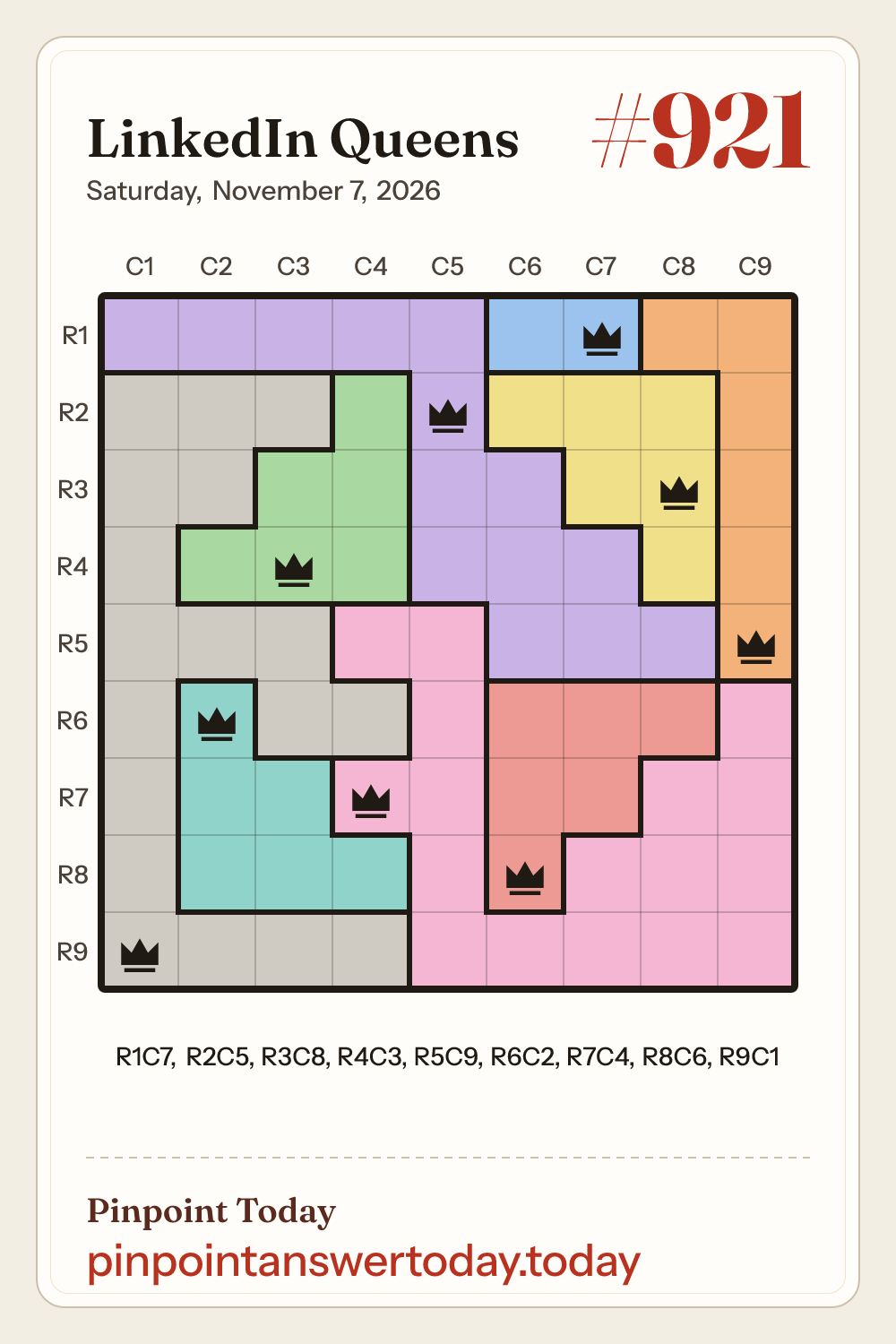
LinkedIn Queens #921 is the puzzle for Saturday, November 7, 2026: an 9x9 board with 9 color regions, and one queen to place in every row, column and region.
Updated 12:05 AM PT, Nov 7
LinkedIn Queens #921 board
Purple14 squares
Orange6 squares
Blue2 squares
Green6 squares
Yellow6 squares
Red6 squares
Pink17 squares
Teal6 squares
Gray18 squares
LinkedIn Queens #921 starting region
Start with the Blue region. It sits entirely in row 1, so no other queen can go in row 1.
0 of 9 queens shown
LinkedIn Queens #921 answer, step by step
Each LinkedIn Queens step places one queen and closes its row, its column, its region and the squares touching it.
Step 1: The Blue region sits entirely in row 1, so no other queen can go in row 1. The Orange region sits entirely in column 9, so no other queen can go in column 9. The Blue, Yellow and Red regions sit entirely in columns 6, 7 and 8, so no other queen can go in those columns. The Purple region sits entirely in column 5, so no other queen can go in column 5. The Pink region sits entirely in column 4, so no other queen can go in column 4. The Green and Teal regions sit entirely in columns 2 and 3, so no other queen can go in those columns. Row 9 has only one open square left, so its queen goes in column 1 (Gray region) (R9C1).
Step 2: The Purple, Green and Yellow regions sit entirely in rows 2, 3 and 4, so no other queen can go in those rows. The Orange region has only one open square left, so its queen goes in row 5, column 9 (R5C9).
Step 3: The Pink region has only one open square left, so its queen goes in row 7, column 4 (R7C4).
Step 4: The Teal region has only one open square left, so its queen goes in row 6, column 2 (R6C2).
Step 5: The Red region has only one open square left, so its queen goes in row 8, column 6 (R8C6).
Step 6: The Blue region has only one open square left, so its queen goes in row 1, column 7 (R1C7).
Step 7: The Yellow region has only one open square left, so its queen goes in row 3, column 8 (R3C8).
Step 8: The Green region has only one open square left, so its queen goes in row 4, column 3 (R4C3).
Step 9: The Purple region has only one open square left, so its queen goes in row 2, column 5 (R2C5).
LinkedIn Queens is a daily puzzle played on a square grid split into color regions. Put one queen in every row, every column and every color region, and no two queens may touch, not even diagonally. Tap a square to cycle through an X mark and a queen; the board is solved when every row, column and region has its queen.
A new LinkedIn Queens board comes out every day at midnight Pacific Time. That is 3:00 a.m. Eastern all year round, and 08:00 GMT while the US is on standard time (early November to mid-March) or 07:00 GMT while it is on daylight saving time (mid-March to early November). Pinpoint Today adds the new board once it is out.
Why can't queens sit diagonally next to each other?
That is one of the LinkedIn Queens rules: two queens may not touch, and touching includes the four squares on the corners. Queens farther apart on the same diagonal line are allowed, unlike in chess. So every queen you place also rules out its eight neighbors, which is how the steps on this page cross squares off.
Stuck on the LinkedIn Queens answer today? Which region should I look at first?
Open the starting region first: it names one color region and why it is a good place to begin. Then reveal one queen at a time and read its step; each step says whether a region, a row or a column had only one open square left, or that the queen comes straight from the solution. Use the full solution only when you want the whole board.
Can I play past LinkedIn Queens puzzles?
Not on LinkedIn: each board expires at midnight Pacific Time and can no longer be played. To look back at an old board, open the LinkedIn Queens answers archive here. It lists boards by month, each with its own page, and has 120 puzzles so far.